
Direct answer
The Amazon prep requirements most likely to cause receiving problems are barcode visibility, FNSKU labeling, suffocation warnings, poly bag size and seal rules, sold-as-set markings, expiration date formatting, bundle labeling, and carton label placement. Most Amazon receiving problems come from inventory that is technically sellable but not scannable, not clearly identified, or not prepared exactly as the inbound shipment expects. Sellers should verify current requirements in Seller Central and use prep providers that document their Amazon packaging requirements workflow before inventory leaves the prep center.
Amazon’s own Fulfillment by Amazon program explains that sellers can send products to Amazon for storage, picking, packing, shipping, customer service, and returns. You can review the program overview at Amazon Fulfillment by Amazon. Specific prep rules can vary by product type, marketplace, shipment plan, and Seller Central updates, so the exact rule language should always be confirmed inside Amazon before publishing or shipping a new SKU.
Why prep errors turn into receiving problems
FBA receiving is built around fast identification. Amazon needs to identify the seller, SKU, condition, quantity, carton, and shipment quickly. When that information is missing or conflicting, inventory may not move cleanly from inbound receiving to available stock.

Common outcomes include delayed check-in, units placed into research, stranded inventory, relabeling fees, shipment discrepancies, or inventory that cannot be sold until the seller fixes the listing or prep issue. These are not always catastrophic problems, but they can interrupt launches, replenish cycles, and cash flow.
The key operating principle is that every prep decision should support scanability, traceability, and unit-level clarity. If a receiving associate or scanner cannot quickly determine what the unit is, what barcode applies, and whether it is one sellable unit or a set, the shipment is already at risk.
Barcode visibility and FNSKU prep
Barcode prep errors are among the most common reasons otherwise acceptable inventory runs into receiving friction. Amazon receiving depends on the correct barcode being visible, scannable, and associated with the right SKU and condition.
For many FBA workflows, sellers use an FNSKU label to identify inventory as belonging to a specific seller. If the manufacturer barcode remains visible when it should be covered, or if the FNSKU is placed over a seam, curve, shrink wrap edge, or textured surface, scanning can fail. If a unit has multiple visible barcodes, Amazon may scan the wrong one or route the item for review.
Operationally, sellers should confirm the required barcode type for each SKU, print labels at a scannable resolution, avoid low-contrast thermal output, and run spot checks before cartons are sealed. If your team is still building its internal labeling process, review FNSKU Labeling Explained before sending a mixed-SKU shipment to a prep partner.
Barcode prep errors to watch for
- FNSKU labels placed over corners, seams, or curved packaging.
- Manufacturer UPC, EAN, or ISBN barcodes left exposed when they should be covered.
- Labels printed too small, too light, smudged, wrinkled, or partially cut off.
- Wrong FNSKU applied to a variation, multipack, bundle, or condition.
- Unit labels that do not match the inbound shipment contents.
Poly bag rules and suffocation warnings
Poly bagging is a simple prep step that creates a surprising number of FBA prep mistakes. Bags that are too loose, unsealed, missing required warnings, or covering the product barcode can create receiving or compliance issues.
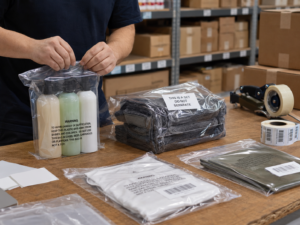
Amazon packaging requirements often address when poly bags must be sealed, when a suffocation warning is required, how much excess bag material is acceptable, and how barcodes should remain scannable through or on the outside of the bag. Because the exact thresholds and wording can change, sellers should verify the current Seller Central prep instructions for the product category and bag dimensions before sending inventory.
In practice, the receiving-safe approach is to treat the poly bag as part of the sellable unit. Once the unit is bagged, the barcode that Amazon needs should still be clearly visible and scannable. If the original barcode is obscured by cloudy film, folds, or a warning label, the prep center should apply the correct label to the outside of the bag.
Common poly bag receiving issues
- The suffocation warning is missing, hard to read, or placed where it interferes with the barcode.
- The bag is not fully sealed and the product can slide out during handling.
- Excess loose plastic makes the unit difficult to scan or convey.
- The FNSKU is inside the bag but not reliably scannable through the film.
- The bag changes the unit dimensions enough to create unexpected handling problems.
Sold-as-set and bundle markings
Receiving problems often happen when a prep center assumes that grouped items are obvious. Amazon does not rely on assumptions. If two or more items are intended to be sold as one unit, the unit needs to be identified clearly as a set or bundle according to Amazon’s current instructions.
This is especially important for multipacks, kits, promotional bundles, and products with loose components. Without a clear sold-as-set marking, a set may be separated during handling or counted incorrectly. That can lead to customer complaints, incomplete orders, stranded inventory, or shipment reconciliation problems.
The bundle label should not replace the required product identifier unless Amazon’s workflow specifically allows it. In most cases, the final sellable unit needs both clear set identification and the correct scannable unit barcode. If items are shrink-wrapped or boxed together, make sure the label is applied to the outside of the final sellable package.
Expiration dates and date-sensitive inventory
Expiration date prep is another area where small formatting differences can create large receiving problems. Date-sensitive products may include food, supplements, cosmetics, health products, and other goods where Amazon requires expiration tracking. Sellers should verify whether the SKU is considered expiration-dated in Seller Central and confirm the required date format, label placement, and minimum shelf-life rules before shipping.
The receiving issue usually appears when the date is missing, not visible on the final sellable unit, inconsistent across a case, or formatted in a way that creates ambiguity. If the product is bagged, boxed, or bundled during prep, the expiration date may need to remain visible or be applied to the outer packaging according to Amazon’s current requirements.
For expiration-dated inventory, do not rely only on the manufacturer’s case markings. The receiving process often needs unit-level clarity. Prep teams should check each lot, avoid mixing lots without documentation, and make sure inbound shipment contents match the dates and quantities expected by the seller.
Carton labels and inbound shipment accuracy
Even if every unit is prepared correctly, carton-level mistakes can slow receiving. Amazon carton labels connect the physical box to the inbound shipment plan. If a carton label is missing, duplicated, damaged, placed on the wrong box, or assigned to different contents than the box actually contains, Amazon may not receive the shipment cleanly.
Carton prep should be treated as a final quality-control step, not an administrative afterthought. The prep center should verify SKU counts, carton quantities, box dimensions, weights, shipment IDs, and carrier labels before pickup. This is especially important for mixed-SKU cartons, replenishment shipments, and inventory that was split across multiple inbound destinations.
Carton label mistakes that create delays
- Amazon box labels placed where tape, stretch wrap, or carrier labels cover them.
- Duplicate carton labels used on multiple boxes.
- Box contents changed after labels were printed but shipment data was not updated.
- Carrier label and Amazon carton label applied to the wrong cartons.
- Unreadable labels caused by low print quality, moisture, abrasion, or poor placement.
Provider checklist for preventing FBA prep mistakes
When evaluating a prep provider, sellers should ask how the company prevents receiving issues rather than only asking for a per-unit prep price. A low prep fee does not help if inventory is delayed, relabeled, or stranded because the workflow lacks verification.
- Confirm whether the provider has documented experience with Amazon packaging requirements and FBA inbound shipments.
- Ask how the provider verifies FNSKU accuracy before labels are applied.
- Review how the provider handles barcode coverage when manufacturer barcodes must not remain visible.
- Ask for the process used to identify poly bag, suffocation warning, and sealing requirements.
- Confirm how sold-as-set, multipack, and bundle labels are applied and checked.
- Ask how expiration dates are captured, formatted, and verified for date-sensitive SKUs.
- Review carton labeling controls, especially for mixed-SKU shipments.
- Ask whether the provider photographs completed prep before cartons are sealed.
- Confirm how discrepancies are reported before the shipment leaves the prep center.
- Ask who is responsible for checking Seller Central instructions when Amazon updates requirements.
If you are comparing providers, use operational questions instead of broad promises. The guide Questions to Ask an FBA Prep Center can help sellers evaluate whether a provider’s process matches the complexity of their SKU catalog.

How to reduce Amazon receiving problems before shipment
The best controls happen upstream. Before inventory leaves the prep center, sellers should have a defined review process for labels, unit packaging, expiration dates, bundle markings, and carton assignments. This does not need to be complicated, but it does need to be consistent.
Start with SKU-level prep instructions. Each SKU should have a clear requirement for barcode type, unit packaging, bagging, warnings, set markings, expiration handling, and case-pack or mixed-carton rules. If a SKU changes packaging or supplier, review the prep instructions again instead of assuming the old workflow still applies.
Then add shipment-level verification. Before cartons are sealed, the prep provider should confirm that the physical inventory matches the shipment plan. After sealing, carton labels should be checked against the box contents and placed where they remain flat, visible, and scannable.
Finally, preserve proof. Photos of completed unit prep, bundle labels, expiration dates, carton labels, and pallet configuration can help resolve disputes and identify where an error occurred. This is especially useful when inventory moves from an overseas supplier to a U.S. prep center and then into Amazon’s network.
FAQ
Which Amazon prep mistakes cause the most receiving delays?
The most common issues are unreadable or incorrect FNSKU labels, exposed manufacturer barcodes, missing suffocation warnings, unclear bundle or sold-as-set markings, missing expiration dates, and carton labels that do not match the shipment plan.
Can Amazon fix prep mistakes after inventory arrives?
Sometimes Amazon may offer labeling or prep services, depending on the product and shipment settings, but sellers should not rely on that as the primary workflow. Errors can still create delays, fees, stranded inventory, or receiving discrepancies.
Should the FNSKU be placed on the product or the poly bag?
The scannable barcode should be visible on the final sellable unit. If the product is placed inside a poly bag and the original label is not reliably scannable through the bag, the correct label is commonly applied to the outside. Sellers should confirm the current requirement in Seller Central for the SKU.
How can sellers choose a prep center for Amazon inventory?
Look for a provider with documented FBA experience, barcode verification controls, clear photo documentation, carton labeling procedures, and a process for checking current Amazon prep instructions before shipping. Category experience matters, especially for bundles, poly-bagged goods, and expiration-dated products.
